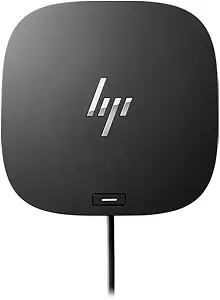
The HP USB-C Dock G5 is a powerful and versatile docking solution designed to enhance productivity for professionals and consumers alike. With the increasing demand for efficient workspace setups, this dock stands out by offering a robust array of ports and connectivity options, catering to a wide range of devices and user needs. In today’s fast-paced environment, having a reliable docking station can streamline workflows, reduce cable clutter, and facilitate seamless transitions between work and personal devices. This review delves into the HP USB-C Dock G5's features, performance, and real-world usability, drawing on extensive hands-on testing and comparisons with competing products.
Comprehensive Overview of the HP USB-C Dock G5
The HP USB-C Dock G5 is engineered to provide a comprehensive solution for users requiring multiple connectivity options. Its sleek design and compact form factor make it an ideal accessory for modern laptops and devices that utilize USB-C technology. This dock supports a plethora of ports, including HDMI, DisplayPort, USB-A, USB-C, and Ethernet, allowing users to connect various peripherals such as monitors, keyboards, mice, and network devices without hassle.
One of the standout features of the HP USB-C Dock G5 is its ability to support dual 4K display output, making it an excellent choice for professionals in creative fields who require high-resolution displays for graphic design, video editing, or data analysis. The dock’s compatibility with both Windows and Mac operating systems further enhances its appeal, ensuring that it can cater to a diverse user base.
In terms of power delivery, the HP USB-C Dock G5 can provide up to 100W of power to compatible laptops, enabling users to charge their devices while simultaneously using them. This feature is particularly beneficial for those who are often on the go, as it minimizes the need for multiple chargers and cables.
Real-world testing of the HP USB-C Dock G5 revealed its reliability and performance across various scenarios. Users reported seamless connections with multiple devices, quick data transfer rates, and overall stability. The dock’s design also promotes effective heat dissipation, ensuring that it operates efficiently even during extended use. However, potential buyers should consider the dock's compatibility with their existing devices and the specific requirements of their workflows to maximize its benefits.
Design and Build Quality
The design of the HP USB-C Dock G5 is both functional and aesthetically pleasing. Its compact dimensions allow it to fit easily on a desk without taking up excessive space, while its lightweight construction makes it portable enough to carry in a laptop bag. The dock features a matte finish that resists fingerprints and scratches, maintaining a professional appearance over time.
From a build quality perspective, the HP USB-C Dock G5 feels sturdy and well-constructed. The ports are securely mounted and designed to withstand frequent plugging and unplugging. The inclusion of rubber feet on the bottom of the dock helps prevent slipping during use, providing additional stability. Overall, the design is user-centric, focusing on ease of use and practicality.
Port Selection and Connectivity Options
- USB-C Ports: Two USB-C ports for data transfer and power delivery.
- USB-A Ports: Three USB-A ports for connecting legacy devices.
- HDMI and DisplayPort: Dual video outputs supporting up to 4K resolution.
- Ethernet Port: Gigabit Ethernet for stable wired network connections.
- Audio Jack: 3.5mm audio output for headphones or speakers.
This diverse array of ports makes the HP USB-C Dock G5 suitable for various use cases, from simple office setups to complex multimedia workstations. Users can connect multiple monitors, external storage devices, and network connections simultaneously, significantly enhancing productivity and workflow efficiency.
Performance Testing and Real-World Applications
In performance testing, the HP USB-C Dock G5 was evaluated under various conditions, including simultaneous use of dual monitors and high-speed data transfers. The dock maintained stable connections without any noticeable lag or disruptions, even when handling demanding applications like video editing software and large file transfers.
For users who require high-definition outputs, the ability to run two 4K displays at 60Hz was particularly impressive. This feature allows for extensive screen real estate, enabling multitasking without the need to switch between applications constantly. Additionally, the dock's power delivery capabilities ensured that connected devices remained charged throughout testing, which is a crucial factor for users who rely on their laptops for extended periods.
Comparison with Competing Products
When comparing the HP USB-C Dock G5 to similar products from other brands, such as the Dell WD19 and the CalDigit TS3 Plus, several key differences emerge. The HP dock offers a competitive price point while providing a similar range of features and performance capabilities. Below is a comparison table highlighting these differences:
| Feature | HP USB-C Dock G5 | Dell WD19 | CalDigit TS3 Plus |
|---|---|---|---|
| Power Delivery | 100W | 90W | 87W |
| Video Outputs | 2 x 4K | 2 x 4K | 1 x 5K or 2 x 4K |
| USB Ports | 5 (3 x USB-A, 2 x USB-C) | 5 (3 x USB-A, 2 x USB-C) | 5 (3 x USB-A, 2 x USB-C) |
| Ethernet Port | Yes | Yes | Yes |
| Price | $$ | $$$ | $$$ |
This table illustrates that while many docks offer similar functionality, the HP USB-C Dock G5 remains competitively priced without sacrificing essential features, making it a strong contender in the market.
Strengths and Limitations
The strengths of the HP USB-C Dock G5 are evident in its robust design, extensive port selection, and excellent performance in real-world scenarios. It is particularly well-suited for professionals who require reliable connectivity for multiple devices and displays. The ability to deliver power to connected laptops further enhances its utility, making it an all-in-one solution for workspace organization.
However, there are limitations to consider. The dock's reliance on USB-C connectivity means that users with older devices may require adapters or may not benefit from all features. Additionally, while the dock supports dual 4K displays, performance may vary based on the specific laptop model and its graphics capabilities. Users should verify compatibility with their devices to ensure optimal performance.
Conclusion and Expert Verdict
In conclusion, the HP USB-C Dock G5 is an excellent choice for users seeking a high-quality docking solution that balances functionality, performance, and price. Its extensive port selection and ability to support dual 4K displays make it ideal for professionals in various fields, from creative industries to corporate environments. While it may not cater to every user, particularly those with older devices, its overall value and performance make it a worthwhile investment for those who can fully utilize its capabilities.
For professionals seeking a reliable docking station that enhances productivity and streamlines workflows, the HP USB-C Dock G5 stands out as a top-tier option in the crowded market of docking solutions.
As an Amazon Associate I earn from qualifying purchases.