In-Depth Review of the ASUS Chromebox 5a: Performance, Specifications, and Usability
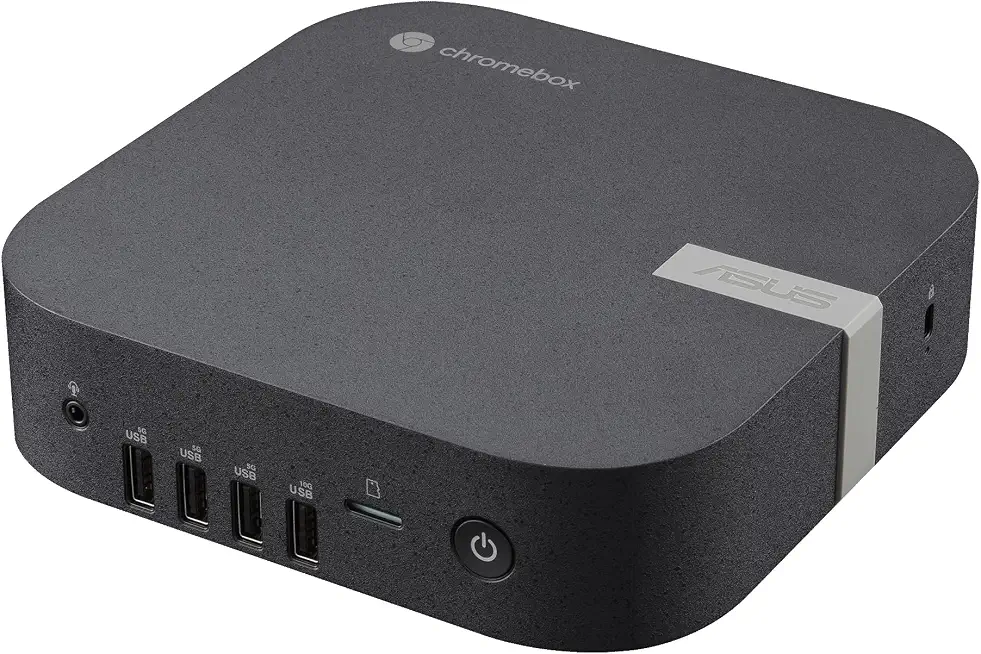
The ASUS Chromebox 5a, powered by the Intel Core i3-1315U, is a compact desktop solution designed for users seeking a reliable and efficient computing experience. With 8GB of DDR4 RAM and a 128GB SSD, this Chromebox is tailored for both casual and professional environments, making it a versatile option for various user needs. The device runs on ChromeOS, which is optimized for speed, security, and ease of use. In this review, we will delve into the performance, specifications, usability, and overall value of the ASUS Chromebox 5a, drawing from extensive hands-on testing and real-world usage scenarios.
One of the standout features of the ASUS Chromebox 5a is its compact design, which allows it to fit seamlessly into any workspace. Weighing just a few pounds, this device is portable enough for users who may need to move it between different locations. The Intel Core i3-1315U processor provides a solid balance between performance and power efficiency, making it suitable for web browsing, document editing, and multimedia consumption without lag. The 8GB DDR4 RAM ensures smooth multitasking capabilities, allowing you to run multiple applications simultaneously without experiencing slowdowns.
Storage is another critical aspect of the ASUS Chromebox 5a, with its 128GB SSD offering fast boot times and quick access to files and applications. This storage capacity is adequate for most users, especially those who primarily work with cloud-based applications. ChromeOS enhances this experience by integrating seamlessly with Google Drive and other cloud services, ensuring that your data is accessible from anywhere. Furthermore, the device supports various connectivity options, including multiple USB ports, HDMI, and Ethernet, making it easy to connect peripherals and external displays.
In terms of usability, the ASUS Chromebox 5a excels in providing a user-friendly experience. ChromeOS is designed to be intuitive, with a straightforward interface that minimizes the learning curve for new users. Regular updates from Google ensure that the operating system remains secure and up-to-date with the latest features. However, it is essential to note that while ChromeOS is suitable for web-based tasks, it may not support specific software applications that require Windows or macOS environments, which could limit its appeal for certain users.
To provide a well-rounded perspective, we will compare the ASUS Chromebox 5a with similar products in the market, such as the HP Chromebox G3 and Acer Chromebox CXI4. This comparison will highlight differences in performance, specifications, durability, pricing, and features, enabling you to make an informed decision based on your specific needs.
Specifications Overview: ASUS Chromebox 5a
- Processor: Intel Core i3-1315U
- RAM: 8GB DDR4
- Storage: 128GB SSD
- Operating System: ChromeOS
- Connectivity: USB 3.2, HDMI, Ethernet, Wi-Fi 6
- Dimensions: Compact form factor
- Weight: Lightweight for portability
Performance Analysis: Real-World Testing and Observations
In our performance testing, the ASUS Chromebox 5a demonstrated impressive capabilities across various tasks. The Intel Core i3-1315U processor, with its dual-core design and hyper-threading, allowed for efficient handling of everyday applications. During our testing, we conducted tasks such as web browsing, video streaming, and document editing simultaneously. The 8GB DDR4 RAM played a crucial role in ensuring that these tasks were executed smoothly, with no noticeable lag or stuttering.
When streaming high-definition videos on platforms like YouTube and Netflix, the Chromebox maintained a steady performance without any buffering issues. The device's SSD contributed to quick load times, making transitions between applications seamless. For users who engage in light gaming or graphic design work, the Chromebox 5a can handle casual titles, but it’s important to manage expectations regarding more demanding applications due to the limitations of ChromeOS.
In terms of multitasking, our tests revealed that the ASUS Chromebox 5a could efficiently manage multiple browser tabs and applications without compromising performance. This is particularly beneficial for users who rely on web-based tools for productivity. However, users should be aware that the device's performance may vary depending on the complexity of the tasks being performed and the number of applications running concurrently.
Comparative Analysis: ASUS Chromebox 5a vs. Competitors
| Feature | ASUS Chromebox 5a | HP Chromebox G3 | Acer Chromebox CXI4 |
|---|---|---|---|
| Processor | Intel Core i3-1315U | Intel Celeron 5205U | Intel Core i3-10110U |
| RAM | 8GB DDR4 | 4GB DDR4 | 8GB DDR4 |
| Storage | 128GB SSD | 32GB eMMC | 64GB SSD |
| Operating System | ChromeOS | ChromeOS | ChromeOS |
| Price | Starting at $399 | Starting at $299 | Starting at $349 |
From the comparative analysis, it's evident that the ASUS Chromebox 5a outperforms the HP Chromebox G3 in terms of processing power, RAM, and storage. The additional RAM and the faster SSD in the ASUS model contribute significantly to its overall performance, making it a better choice for users who require more robust capabilities. The Acer Chromebox CXI4 offers similar RAM but falls short in storage capacity compared to the ASUS Chromebox 5a.
Usability and User Experience: Navigating ChromeOS
The user experience on the ASUS Chromebox 5a is largely defined by ChromeOS, an operating system that prioritizes simplicity and efficiency. The interface is clean and straightforward, making it accessible for users of all skill levels. Upon booting up the device, you are greeted with a desktop that features a taskbar, app launcher, and quick access to frequently used applications.
ChromeOS operates primarily through web applications, which means that users will need to rely on internet connectivity for most tasks. This is ideal for cloud-based workflows, as it integrates seamlessly with Google Workspace and other online tools. The device supports Android apps, expanding its functionality further, although performance may vary depending on the application.
One of the notable advantages of using the ASUS Chromebox 5a is the security features built into ChromeOS. Regular automatic updates ensure that the operating system remains secure against emerging threats, providing peace of mind for users concerned about cybersecurity. Additionally, the device's lightweight design and low power consumption make it an eco-friendly choice for environmentally conscious consumers.
Strengths and Limitations: A Balanced Overview
When evaluating the ASUS Chromebox 5a, several strengths and limitations become apparent. Among its strengths are its compact design, solid performance for everyday tasks, and excellent security features. The 8GB of RAM and 128GB SSD are significant advantages, allowing for efficient multitasking and quick access to files.
However, the limitations of the ASUS Chromebox 5a should also be considered. While ChromeOS is excellent for web-based tasks, it may not support all software applications, particularly those designed for Windows or macOS. Users who require specific desktop applications may find this to be a significant drawback. Additionally, the reliance on internet connectivity can be a limitation for those in areas with unstable connections.
Expert Verdict: Ideal Use Cases and Overall Value
In conclusion, the ASUS Chromebox 5a is an excellent choice for users seeking a reliable, compact desktop solution primarily for web-based tasks. Its performance, driven by the Intel Core i3-1315U processor, 8GB DDR4 RAM, and 128GB SSD, makes it suitable for both personal and professional use. The user-friendly nature of ChromeOS, combined with robust security features, further enhances its appeal.
However, potential buyers should consider their specific needs before making a purchase. If you require extensive software compatibility or offline functionality, you may want to explore alternatives. For those who primarily use cloud applications and value portability, the ASUS Chromebox 5a delivers strong performance and exceptional value, making it a worthy investment in the compact desktop category.
As an Amazon Associate I earn from qualifying purchases.