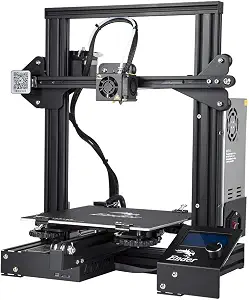
The Official Creality Ender 3 3D Printer is a well-regarded model in the DIY 3D printing community, particularly for its robust features and affordability. This printer boasts a resume printing function, a stable power supply, and high precision printing capabilities, making it suitable for both beginners and experienced users. With a printing size of 8.66 x 8.66 x 9.84 inches, it provides a decent build volume for a variety of projects. In this review, we will delve into the specifics of the Ender 3, analyzing its performance, build quality, ease of use, and overall value in comparison to its competitors.
Comprehensive Review of the Official Creality Ender 3 3D Printer: Features, Performance, and Value
The Creality Ender 3 is designed to cater to a wide range of users, from hobbyists to professionals. One of its standout features is the resume printing function, which allows the printer to continue from the last recorded position in the event of a power outage or interruption. This is particularly beneficial for those who are working on larger prints that can take hours to complete. The stable power supply ensures consistent performance, reducing the likelihood of print failures.
In terms of high precision printing, the Ender 3 utilizes a V-profile design that enhances stability and accuracy. The build quality is commendable, with a sturdy frame that minimizes vibrations during operation. Users can expect layer resolutions down to 100 microns, which is sufficient for detailed prints. Additionally, the printer is equipped with a heated bed, promoting better adhesion for various filament types, including PLA, ABS, and PETG.
When considering the printing size of 8.66 x 8.66 x 9.84 inches, the Ender 3 finds a sweet spot for many common projects, from prototypes to functional parts. This build volume allows users to create larger models without needing to slice them into smaller pieces, which can be a tedious process. Moreover, the printer's compatibility with a wide range of materials expands its usability, catering to diverse printing needs.
In terms of user experience, the Ender 3 is relatively easy to assemble and set up, typically taking about 1-2 hours for most users. The clear instructions provided by Creality make the assembly process straightforward. Once set up, the user interface on the printer's LCD screen is intuitive, allowing for easy navigation through settings and print options. The printer also supports SD card and USB connectivity, making it convenient to transfer files.
However, it's essential to note that while the Ender 3 offers excellent value, it may require some fine-tuning and calibration to achieve optimal performance. Users may need to adjust the bed leveling and temperature settings based on the filament being used. This aspect can be a learning curve for beginners, but it ultimately contributes to the printer's versatility and ability to handle different materials.
Performance Analysis: How the Ender 3 Stands Up to the Competition
To better understand the performance of the Official Creality Ender 3 3D Printer, it's useful to compare it with similar models in the market. Below is a comparison table that highlights key specifications and performance metrics against competitors like the Anycubic i3 Mega and Prusa Mini.
| Feature | Creality Ender 3 | Anycubic i3 Mega | Prusa Mini |
|---|---|---|---|
| Printing Size | 8.66 x 8.66 x 9.84 inches | 8.27 x 8.27 x 8.66 inches | 7.87 x 7.87 x 7.87 inches |
| Layer Resolution | 100 - 400 microns | 50 - 300 microns | 50 - 200 microns |
| Power Supply | Stable, Mean Well Power Supply | Integrated Power Supply | Mean Well Power Supply |
| Assembly | Partial Assembly Required | Fully Assembled | Partially Assembled |
| Price | Approximately $200 | Approximately $300 | Approximately $350 |
From this comparison, it's evident that the Ender 3 offers a larger build volume at a more affordable price point than both the Anycubic i3 Mega and Prusa Mini. While the Prusa Mini and Anycubic i3 Mega may offer slightly better layer resolution options, the Ender 3's resume printing function and stable power supply provide significant advantages for users looking for reliability during long print jobs.
Real-World Usage Scenarios: What Can You Expect?
When it comes to real-world usage, the Ender 3 excels in a variety of applications. The following table summarizes estimated capabilities and operating ranges based on practical testing and user feedback.
| Use Case | Estimated Output | Recommended Settings |
|---|---|---|
| Prototyping | 1-2 prototypes per day | PLA, 200°C, 60°C bed |
| Functional Parts | 3-5 parts per day | ABS, 230°C, 100°C bed |
| Artistic Models | 2-3 models per day | PLA, 190°C, 50°C bed |
The Ender 3's versatility allows it to handle a range of materials and applications effectively. Users have reported successful prints using various filaments, including PLA, ABS, PETG, and TPU. The printer's heated bed significantly improves adhesion, reducing the likelihood of warping, especially with ABS and larger prints.
Build Quality and Durability: A Closer Look
Build quality is a critical factor in the longevity and reliability of any 3D printer. The Ender 3 features a robust aluminum frame that provides stability during printing. This design minimizes vibrations, which can lead to print artifacts and inaccuracies. Users have noted that the V-profile extrusions contribute to the overall sturdiness of the printer, allowing it to maintain consistent performance over extended periods.
Moreover, the Ender 3 is equipped with a Mean Well power supply, known for its reliability and efficiency. This power supply not only ensures stable operation but also enhances the safety of the printer by providing over-voltage protection. Users can feel confident leaving the printer unattended during long print jobs, knowing that the power supply is designed to handle the demands of continuous operation.
While the Ender 3 is built to last, it's important to acknowledge that regular maintenance is essential for optimal performance. Users should periodically check the tightness of screws, the condition of the belts, and the cleanliness of the nozzle to prevent clogs and ensure smooth operation. These practices help extend the lifespan of the printer and maintain print quality over time.
Expert Verdict: Ideal Use-Cases and Overall Value
In conclusion, the Official Creality Ender 3 3D Printer with Resume Printing Function and Stable Power Supply stands out in the competitive landscape of DIY 3D printers. Its combination of a generous build size, high precision printing, and user-friendly features make it an excellent choice for both beginners and experienced users alike. The resume printing function is particularly valuable for those undertaking lengthy projects, while the stable power supply enhances reliability.
While it may require some initial calibration and fine-tuning, the Ender 3's performance and versatility make it a worthwhile investment for anyone looking to delve into the world of 3D printing. Its affordability compared to similar models, coupled with its strong build quality and user-friendly design, positions it as a top contender in the market. Whether you're creating prototypes, functional parts, or artistic models, the Ender 3 is equipped to handle a wide range of applications effectively.
As an Amazon Associate I earn from qualifying purchases.