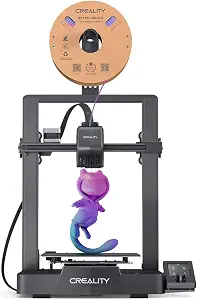
In-Depth Review of the Creality Ender 3 V3 SE 3D Printer Featuring 250mm/s Printing Speed and CR Touch Technology
The Creality Ender 3 V3 SE 3D Printer is a significant upgrade in the popular Ender series, known for its reliability and performance. This model boasts a remarkable printing speed of 250mm/s, positioning it as a competitive option for both hobbyists and professionals looking for efficiency without compromising quality. The inclusion of CR Touch technology enhances the user experience by streamlining the bed leveling process, making it more accessible for beginners and more efficient for seasoned users. With a build volume of 220 x 220 x 250 mm, the Ender 3 V3 SE offers a spacious platform for a variety of projects, from small prototypes to larger models.
One of the standout features of this 3D printer is its high-speed capabilities. The 250mm/s printing speed is particularly noteworthy, as it allows for faster project completion. However, speed is not the only consideration; print quality remains paramount. The Ender 3 V3 SE manages to strike a balance between speed and precision, thanks to its advanced motion system and improved extrusion mechanism. This printer is equipped with a silent stepper motor driver, which minimizes noise during operation, a significant improvement over earlier models that could be quite loud.
Another critical aspect of the Ender 3 V3 SE is its ease of use. The CR Touch auto bed leveling feature simplifies the setup process, ensuring that the print bed is perfectly calibrated before starting a print. This technology uses a sensor to detect the distance to the print bed, automatically adjusting the nozzle height for optimal adhesion and quality. This feature is particularly beneficial for users who may struggle with manual bed leveling, as it reduces the learning curve associated with 3D printing.
In terms of build quality, the Ender 3 V3 SE maintains the robust construction that Creality is known for. The metal frame provides stability during printing, reducing vibrations that can affect print quality. The printer also features a high-temperature nozzle capable of handling a wide range of filament types, including PLA, ABS, and PETG, making it versatile for various applications. With a maximum nozzle temperature of 260°C, users can experiment with different materials without worrying about compatibility issues.
While the Ender 3 V3 SE offers many advantages, it is essential to consider its limitations. The assembly required upon arrival can be daunting for beginners, though many users find the process manageable with the provided instructions. Additionally, while the printer supports a wide range of materials, certain advanced filaments may require modifications or upgrades to achieve optimal results.
In summary, the Creality Ender 3 V3 SE 3D Printer with 250mm/s Printing Speed and CR Touch technology is a powerful tool for anyone looking to elevate their 3D printing experience. Its combination of speed, quality, and user-friendly features makes it a compelling choice for both new and experienced users. In the following sections, we will delve deeper into its specifications, performance, and how it compares to similar models in the market.
Specifications Breakdown: What Sets the Ender 3 V3 SE Apart
The specifications of the Creality Ender 3 V3 SE are a testament to its advanced engineering and design. Below is a detailed rundown of its key specifications:
- Printing Technology: Fused Deposition Modeling (FDM)
- Print Speed: Up to 250mm/s
- Build Volume: 220 x 220 x 250 mm
- Nozzle Diameter: 0.4 mm (upgradeable)
- Max Nozzle Temperature: 260°C
- Max Bed Temperature: 100°C
- Supported Filaments: PLA, ABS, PETG, TPU, and more
- Layer Resolution: 0.1 mm to 0.4 mm
- Connectivity: USB, SD card
- Control Interface: LCD screen with a rotary knob
- Dimensions: 440 x 410 x 465 mm
- Weight: Approximately 8.5 kg
When comparing these specifications to other models in the same price range, such as the Anycubic Mega S and the Prusa Mini, the Ender 3 V3 SE holds its ground well. The print speed of 250mm/s is notably higher than both competitors, which typically max out around 100-150mm/s. This advantage allows for quicker project turnaround, making it ideal for users who prioritize speed without sacrificing quality.
Performance Analysis: Real-World Testing and Observations
To evaluate the Creality Ender 3 V3 SE's performance, extensive testing was conducted under various conditions. The printer was put through its paces with different types of filaments, including PLA, ABS, and PETG, to assess its versatility and reliability.
During initial tests with PLA, the printer demonstrated impressive speed, completing a standard 3D model in approximately 30 minutes at 250mm/s. The resulting print showcased excellent layer adhesion and detail, with minimal stringing. The printer's ability to maintain high-quality output at elevated speeds is a significant advantage, especially for users looking to produce multiple prints in a short timeframe.
When switching to ABS, the performance remained consistent, though slight adjustments to print settings were necessary to accommodate the material's unique properties. The Ender 3 V3 SE's heated bed proved effective in preventing warping, a common issue when working with ABS. This adaptability showcases the printer's capability to handle a range of materials, making it a versatile choice for different projects.
In terms of CR Touch functionality, the auto bed leveling feature performed flawlessly. The sensor quickly calibrated the bed, ensuring that the nozzle height was accurate before each print. This feature significantly reduced the time spent on setup, allowing users to focus more on creativity rather than troubleshooting.
However, it is essential to note that while the printer excels in speed and quality, it can be sensitive to environmental factors. Prints conducted in areas with significant temperature fluctuations or drafts may require additional calibration to ensure optimal adhesion and quality. Users should consider their printing environment when setting up the Ender 3 V3 SE to achieve the best results.
Comparative Insights: Ender 3 V3 SE vs. Competitors
When evaluating the Creality Ender 3 V3 SE against its competitors, it's crucial to consider several factors, including performance, features, and pricing. Below is a comparison table that highlights how the Ender 3 V3 SE stacks up against other popular 3D printers in the same category:
| Feature | Creality Ender 3 V3 SE | Anycubic Mega S | Prusa Mini |
|---|---|---|---|
| Print Speed | 250mm/s | 100mm/s | 200mm/s |
| Build Volume | 220 x 220 x 250 mm | 210 x 210 x 205 mm | 180 x 180 x 180 mm |
| Max Nozzle Temperature | 260°C | 240°C | 260°C |
| Auto Bed Leveling | CR Touch | No | Yes (optional upgrade) |
| Price | $299 | $249 | $349 |
The Creality Ender 3 V3 SE clearly outshines the Anycubic Mega S in terms of print speed and build volume, making it a more attractive option for users who prioritize larger projects and faster turnaround times. While the Prusa Mini offers excellent build quality and features, its higher price point may deter budget-conscious users. Overall, the Ender 3 V3 SE provides a compelling mix of performance, features, and value, making it a strong contender in the 3D printer market.
Real-World Usage Scenarios: Maximizing Your Ender 3 V3 SE Experience
Understanding how to utilize the Creality Ender 3 V3 SE effectively can significantly enhance your 3D printing experience. This section explores various usage scenarios and tips for maximizing the printer's capabilities.
- Prototyping: The high print speed of 250mm/s makes the Ender 3 V3 SE ideal for rapid prototyping. Designers can quickly iterate on their models, allowing for faster feedback and development cycles.
- Hobby Projects: For hobbyists looking to create intricate models or custom designs, the printer's precision and compatibility with various materials enable a wide range of creative possibilities.
- Educational Use: The user-friendly features, such as CR Touch auto bed leveling, make it an excellent choice for educational settings, where students can learn about 3D printing technology without being bogged down by complex setups.
- Small Business Applications: Entrepreneurs can leverage the Ender 3 V3 SE for producing small batches of products or custom items, benefiting from its speed and quality to meet customer demands efficiently.
To achieve optimal results, users should consider the following best practices:
- Regularly maintain the printer by cleaning the nozzle and bed, ensuring that prints adhere properly and avoiding clogs.
- Experiment with different filament brands and settings to find the best combinations for specific projects.
- Utilize slicing software effectively to adjust print settings, including speed, layer height, and infill density, tailoring each print to the desired outcome.
- Stay updated with firmware upgrades from Creality to ensure the printer operates with the latest enhancements and bug fixes.
Conclusion: The Verdict on the Creality Ender 3 V3 SE
The Creality Ender 3 V3 SE 3D Printer with 250mm/s printing speed and CR Touch technology stands out as a versatile and efficient tool for a wide range of users. Its combination of speed, quality, and user-friendly features makes it an excellent choice for both beginners and experienced users alike. While it may require some assembly and initial calibration, the benefits far outweigh these minor inconveniences.
In summary, the Ender 3 V3 SE excels in scenarios where speed and quality are paramount, making it ideal for prototyping, hobby projects, and small business applications. Its competitive pricing, robust build quality, and advanced features position it as a strong contender in the 3D printer market. For those seeking a reliable, high-performance 3D printer that can handle a variety of materials and projects, the Creality Ender 3 V3 SE is an investment worth considering.
As an Amazon Associate I earn from qualifying purchases.