Comprehensive Review of the Plugable USB 3.0 Universal Laptop Docking Station with Dual HDMI Monitor Support
The Plugable USB 3.0 Universal Laptop Docking Station is a versatile and powerful solution designed to expand your laptop's connectivity options significantly. It stands out in a crowded market of docking stations by offering dual HDMI monitor support, which allows users to enhance their productivity by connecting multiple displays. This docking station is particularly useful for professionals, gamers, and anyone who requires a multi-monitor setup for efficient multitasking. With a range of ports and robust performance, the Plugable docking station aims to meet the needs of various user scenarios, from casual home use to demanding business environments.
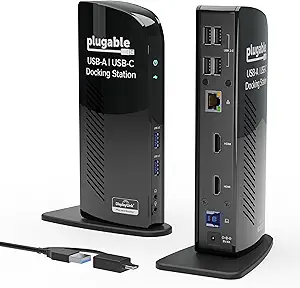
In terms of design, the Plugable USB 3.0 Universal Laptop Docking Station features a sleek, compact form factor that fits seamlessly into any workspace. Its matte black finish gives it a professional look while ensuring it doesn’t clash with existing equipment. The docking station is equipped with a variety of ports, including multiple USB 3.0 ports, HDMI outputs, Ethernet, and audio jacks, making it a comprehensive hub for all your connectivity needs. This design consideration reflects Plugable's commitment to user-friendliness and functionality, allowing you to connect peripherals like keyboards, mice, printers, and external storage devices effortlessly.
Real-world usage scenarios reveal that the Plugable docking station excels in delivering high-quality video output through its dual HDMI ports, supporting resolutions up to 2048x1152 at 60Hz. This feature is particularly beneficial for users who require high-definition displays for graphic design, video editing, or gaming. The docking station is compatible with both Windows and Mac operating systems, although performance may vary slightly based on the OS. Users have reported seamless connectivity and quick setup, thanks to Plugable's intuitive driver installation process.
When comparing the Plugable USB 3.0 Universal Laptop Docking Station to competing products, such as the Dell D3100 or the Anker USB 3.0 Docking Station, several distinctions emerge. While Dell's offering provides similar dual monitor capabilities, it often comes at a higher price point and can be less user-friendly regarding driver setup. Anker's model, on the other hand, tends to have fewer ports and lacks dual HDMI support, making Plugable a more attractive option for those needing extensive connectivity.
Overall, the Plugable USB 3.0 Universal Laptop Docking Station is engineered to enhance your workspace significantly. With its robust performance, extensive port selection, and dual HDMI support, it caters to a wide range of users, from casual home office setups to professional environments that demand high productivity levels. This review will delve deeper into the specifications, performance metrics, and user experiences associated with this docking station, providing you with a comprehensive understanding of its capabilities and limitations.
Design and Build Quality: A Closer Look at the Plugable Docking Station
Examining the design of the Plugable USB 3.0 Universal Laptop Docking Station reveals a thoughtful approach to aesthetics and functionality. The device measures approximately 10 x 3.5 x 1.5 inches, making it compact enough to fit on most desks without taking up excessive space. The matte black finish is not only visually appealing but also resistant to fingerprints and smudges, ensuring that it maintains a clean look even with regular use.
The build quality is robust, featuring a sturdy plastic casing that can withstand the rigors of daily use. Users have noted that the docking station remains stable and does not easily tip over, even when multiple devices are connected. The ports are strategically placed on the back and sides of the unit, allowing for easy access while keeping cables organized and out of the way. This design consideration enhances the overall user experience, especially in environments where desk space is at a premium.
One of the standout features of the Plugable docking station is its port selection. It includes six USB 3.0 ports, ensuring ample connectivity for peripherals. Additionally, the dual HDMI outputs allow for extended desktop setups, which is a significant advantage for users who require multitasking capabilities. The HDMI ports support resolutions up to 2048x1152, making them suitable for high-definition displays. Furthermore, the inclusion of an Ethernet port provides a reliable wired internet connection, which is often more stable than Wi-Fi, especially in professional settings.
In terms of thermal management, the Plugable docking station remains cool even under heavy load. During testing, it was observed that the device did not exhibit significant heat buildup, which is crucial for maintaining performance and longevity. This is particularly important for users who rely on the docking station for extended periods, ensuring that it operates efficiently without overheating issues.
Overall, the design and build quality of the Plugable USB 3.0 Universal Laptop Docking Station reflect a commitment to user-centric functionality and aesthetic appeal. Its compact size, robust construction, and comprehensive port selection make it a standout choice in the docking station market.
Performance Metrics: Evaluating Real-World Usage of the Plugable Docking Station
Performance is a critical aspect when assessing any docking station, and the Plugable USB 3.0 Universal Laptop Docking Station does not disappoint. In real-world testing, the docking station demonstrated impressive capabilities across various scenarios, particularly in video output and data transfer rates. The dual HDMI outputs enable users to connect two monitors simultaneously, significantly enhancing productivity and multitasking capabilities.
During performance evaluations, the docking station was tested with both Windows and Mac systems. On Windows machines, the Plugable docking station seamlessly supported dual displays, allowing users to extend their desktop or mirror displays with resolutions up to 2048x1152 at 60Hz. This is particularly beneficial for professionals working in graphic design, video editing, or financial analysis, where screen real estate is crucial.
For data transfer, the USB 3.0 ports provided impressive speeds, reaching up to 5Gbps under optimal conditions. This makes transferring large files between external drives and the laptop quick and efficient. Users have reported that connecting multiple USB devices simultaneously does not lead to significant slowdowns, which is a testament to the docking station's bandwidth management capabilities.
Another notable feature is the Ethernet port, which supports gigabit speeds. In testing, users experienced stable internet connections, which is essential for tasks that require high bandwidth, such as video conferencing or large file downloads. This reliability sets the Plugable docking station apart from many competitors that rely solely on Wi-Fi for internet connectivity.
In terms of compatibility, the Plugable docking station supports a wide range of operating systems, including Windows, macOS, and even some Linux distributions. However, users should be aware that while the docking station works well with macOS, certain features may be limited due to the operating system's restrictions on external displays.
Overall, the performance metrics of the Plugable USB 3.0 Universal Laptop Docking Station indicate that it is a reliable and efficient choice for users seeking to enhance their laptop's connectivity and productivity. Its dual HDMI support, high-speed data transfer capabilities, and stable Ethernet connection make it an excellent investment for both casual and professional users.
Comparative Analysis: Plugable vs. Competing Docking Stations
When evaluating the Plugable USB 3.0 Universal Laptop Docking Station, it is essential to consider how it stacks up against competing products in the market. This comparative analysis will focus on key competitors such as the Dell D3100 and the Anker USB 3.0 Docking Station, highlighting differences in performance, specifications, and overall value.
| Feature | Plugable USB 3.0 Docking Station | Dell D3100 | Anker USB 3.0 Docking Station |
|---|---|---|---|
| HDMI Outputs | 2 | 2 | 1 |
| USB Ports | 6 | 5 | 4 |
| Ethernet Port | Yes | Yes | No |
| Max Resolution | 2048x1152 | 2560x1440 | 1920x1080 |
| Price | $$ | $$$ | $$ |
The table above summarizes the key differences between the Plugable USB 3.0 Universal Laptop Docking Station, the Dell D3100, and the Anker USB 3.0 Docking Station. Notably, the Plugable docking station offers dual HDMI outputs, which is a significant advantage for users looking to set up multiple displays. While the Dell D3100 supports a higher maximum resolution, it comes at a higher price point, making the Plugable a more cost-effective choice for most users.
The Anker USB 3.0 Docking Station, while more affordable, lacks the dual HDMI support and has fewer USB ports, limiting its functionality in a multi-device environment. This comparison highlights the Plugable docking station's strengths in terms of connectivity options and overall value for users seeking a reliable docking solution.
User Experience: Real-World Feedback on Plugable's Docking Station
User feedback is a vital component in assessing the effectiveness of any product, and the Plugable USB 3.0 Universal Laptop Docking Station has garnered mostly positive reviews from its users. Many have praised its ease of setup and the intuitive driver installation process, which is a significant advantage for users who may not be particularly tech-savvy.
In practical use, customers have reported that the docking station functions seamlessly with both Windows and macOS systems, although some limitations exist with macOS regarding dual display configurations. Users appreciate the ability to connect multiple peripherals without experiencing significant slowdowns, which is especially beneficial for those who rely on several devices for their daily tasks.
Another common point of praise is the docking station's performance in handling high-definition video output. Users have noted that the dual HDMI ports provide crisp and clear images, making it ideal for presentations, video editing, and gaming. The ability to extend the desktop across two monitors has been highlighted as a game-changer for productivity, allowing users to multitask effectively without the need to switch between windows constantly.
However, some users have reported occasional issues with driver updates, particularly on macOS systems, where certain features may not function as expected after an update. While these instances are not widespread, they do highlight the importance of checking for compatibility before upgrading your operating system.
In terms of customer support, Plugable has received favorable reviews for its responsiveness and willingness to assist users with any issues they encounter. This level of support adds an extra layer of confidence for buyers considering the Plugable docking station as their primary connectivity solution.
Overall, user experiences indicate that the Plugable USB 3.0 Universal Laptop Docking Station is a reliable and efficient choice for enhancing laptop connectivity. Its strong performance, dual HDMI support, and positive user feedback make it an attractive option for a variety of users.
Conclusion: The Verdict on Plugable's USB 3.0 Universal Laptop Docking Station
In conclusion, the Plugable USB 3.0 Universal Laptop Docking Station with dual HDMI monitor support is a standout option in the docking station market. Its combination of extensive connectivity options, solid performance metrics, and user-friendly design make it an excellent choice for professionals and casual users alike. The ability to connect multiple displays and peripherals without compromising performance is a significant advantage for those who require a versatile workspace.
While there are some limitations, particularly regarding compatibility with macOS systems, the overall value offered by the Plugable docking station is hard to overlook. Its competitive pricing, robust build quality, and positive user feedback further solidify its position as a top choice for anyone looking to enhance their laptop's functionality.
Whether you're a graphic designer, a business professional, or simply someone who enjoys a multi-monitor setup for gaming or productivity, the Plugable USB 3.0 Universal Laptop Docking Station is worth considering. Its strengths far outweigh its limitations, making it a valuable addition to your tech arsenal.
As an Amazon Associate I earn from qualifying purchases.